
At a glance: KÜT is a free online Küt okey app for iPhone and iPad. Join an open four-player table or set one up with friends. Tables include text chat, quick messages and emoji; you can play SOLO or TEAM, and treat players at the table to tea, a fruit platter or a hookah.
Setting up a Friends’ Table
- Create your table. Open Friends in the app and tap CREATE TABLE. Choose the number of rounds and whether to play SOLO or TEAM.
- Invite your friends. Tap INVITE next to a friend on your list, or share the table’s invite link on WhatsApp. The link opens the same table for everyone.
- Arrange the seats. You decide who sits where. At a TEAM table, your partner sits opposite you.
- Start the game. Once everyone is seated, start the game. Anyone who joins via the link for the first time is added to your friends list automatically, so next time you only need to tap INVITE.
Direct invites sent from your friends list are valid for 10 minutes. If you share the table’s invite link in a group chat, anyone who opens it takes an empty seat at that same table, and you can still rearrange the seats afterwards.
Table chat
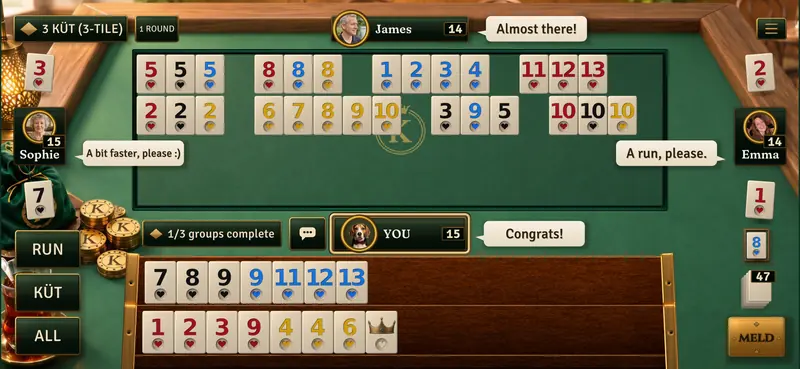
You can chat with everyone at the table during a game. Every message you send goes to the whole table and also pops up in a chat bubble beside that player’s seat.
- Quick messages and emoji are open to everyone. Preset lines such as “Good luck.” and “Good game.”, plus five emoji: 😂 👏 🔥 😭 👍.
- To type in chat, you need to sign in with Apple, Google or Facebook.
- Chat is moderated. Swearing, abuse and threats are filtered out before they reach the table; accounts that repeatedly break the rules are temporarily muted.
- You stay in control. You can report or block a player, or turn chat off altogether in Settings.
- Chat is stored for 30 days. After a table closes, chat logs are kept for moderation and debugging, visible only to the KÜT team, and deleted after 30 days. See the Privacy page for details.
Full chat guidelines are on the Community rules page.
SOLO or TEAM
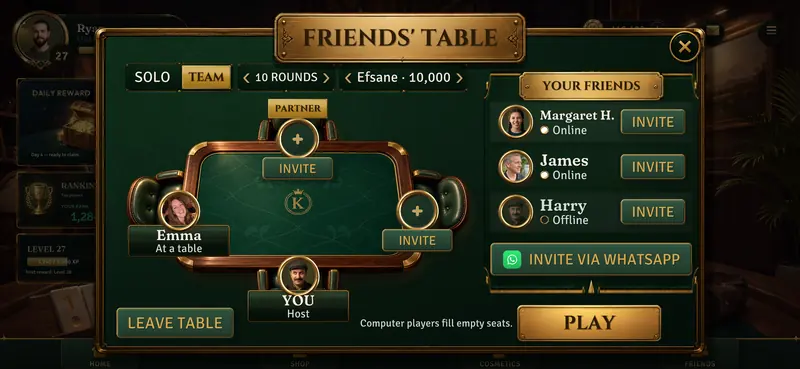
At a SOLO table, everyone plays for themselves. At a TEAM table, the two players sitting opposite each other form a pair: when one partner goes out to end the round, the other also scores 0 for that round, and the team with the lower combined penalty points wins the match.
At a Friends’ Table, you choose your own partner. Full rules are on the TEAM Küt page.
Sending gifts
 Roasted chickpeas
 Sunflower seeds
 Tea
 Simit basket
 Fruit platter
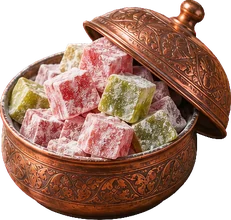 Turkish delight
 Soda crate
 Hookah
Round on me. Send a player one of eight treats, from roasted chickpeas to a hookah, or treat the whole table; everyone there sees it. Table gifts cost in-game chips.
Gift chips to a friend. You can send gift chips to each friend once a day. These chips do not come out of your chip balance. An account can receive at most 3 gifts per day; to send and receive gifts, both accounts must be at least 7 days old and have played 5 games.
Match length and League
Pick a table length to suit how much time you have: BLITZ is one round, 5 ROUNDS is five rounds, and MARATHON is ten rounds. In a single-round BLITZ game, the contract is drawn at random.
In the weekly League, you climb from Bronze to Master, and only real players appear in the rankings.
Fair dealing
The tiles are cryptographically sealed before they are dealt. When the round ends, the app verifies the seal automatically, proving that the deal was not altered afterwards. The server enforces the rules, and your opponents’ tiles never reach your phone.
Frequently asked questions
Is online Küt free?
Yes. KÜT is free and has no adverts. You use in-game chips to join a table; you receive chips from the Daily Reward, and optional chip packs are also available. Chips cannot be exchanged for money.
What if my friend doesn’t have the app?
If a friend opens the invite link without the app installed, they are taken to the App Store. When they install and open the app for the first time, it offers them a seat at the table they were invited to.
Is there voice chat at the table?
No. Tables have text chat, quick messages and emoji, but no voice chat.
Can I turn chat off?
Yes. If you turn off table chat in Settings, you won’t see anyone’s messages or be able to send any yourself. You can also block individual players.
Can I join an online table without knowing how to play Küt?
You can, though we recommend completing the short tutorials when you first open the app. They teach you Küt groups, runs, Okey and contracts as you play. You can also read the full rules on the How to play Küt okey page.
Can I play on a computer?
No. KÜT is made for iPhone and iPad; the Android version is in closed testing on Google Play.
What language is the app in?
The app is available in Turkish, English and German.